Can AI make front, back and side views of my sandals for free?
Yes. Drop one photo of your sandal and get its front and back on an invisible mannequin, free with no account, then the four views for 16 credits.
Drop your sandal photo here
or choose one from your phone or computer
JPEG, PNG or WebP. Any phone photo works.
Free: the front and the back, 2 free renders in one run.
Signed in, after the free run: 4 views for 16 credits.
Your photo is stored for 30 days, then deleted. It is used to make your image, and by the studio if you continue there. If you order a pattern from it, a copy is kept with your order.
On this platform the AI does the design and visualisation work and a human pattern maker cuts the pattern. That split is deliberate. How the pattern is made.
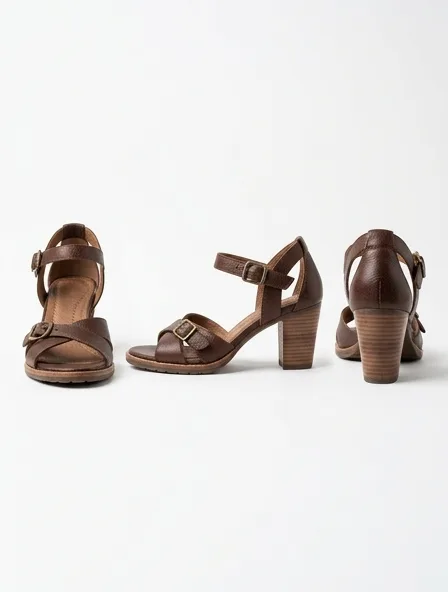
Multi-Angle Views for a sandal
Multi-angle views show your sandal from the front, the side and the back, identical from one view to the next, for a shop listing or a buyer's sheet.
The side of a sandal is where buyers judge depth and profile, so give its proportions.
What you get
Front, side and back views of the sandal, identical from one view to the next, for a shop listing or a buyer's sheet.
Step by step
- Start from a clear front image of the sandal.
- Describe the back: fastenings, seams, vents.
- Ask for the views together so they match.
- Add a close view of the one feature buyers ask about.
A common mistake
Leaving the back to chance: if it is not described, the views may invent one.
How the usual cloths for sandals hold their shape from each side
- Shoe upper leather
- The same shape from every side
Typical trade ranges, not one mill's figures: confirm them with your mill.
The sandal, in numbers
- Fastens with
- A buckle or a strap
- Defining details
- Strap layout, buckle or slip-on, footbed, sole height
Typical figures for an adult size M.
Also: how the studio works, prices and questions and answers.
Start free