Can AI make a ghost mannequin photo for free?
Yes. This free AI ghost mannequin generator turns one photo of the garment, worn, on a hanger or on a dress form, into a packshot on white in about twenty seconds: the body gone, the worn shape kept, the inside of the neck rebuilt. Your first 2 renders are free, with no account.
Two free renders, shared across all our tools. No account.
Drop a garment photo here
or choose one from your phone or computer
JPEG, PNG or WebP. Any phone photo works.
Your photo is stored for 30 days, then deleted. It is used to make your image, and by the studio if you continue there. If you order a pattern from it, a copy is kept with your order.
What a ghost mannequin photo is
A ghost mannequin photo shows a garment holding the shape of a body with no body in it. The shoulders are filled, the sleeves hang as if an arm were inside, and through the neck opening you see the inside of the back collar. It is the packshot most apparel product grids and marketplaces lead with, because the cut reads at a glance and nothing distracts from the garment.
In a studio it takes two shots and an editor. The garment is photographed on a mannequin, then turned inside out or photographed again for the inside of the neck, and the two are masked and joined by hand. The tool on this page does that work from one photo you already have.
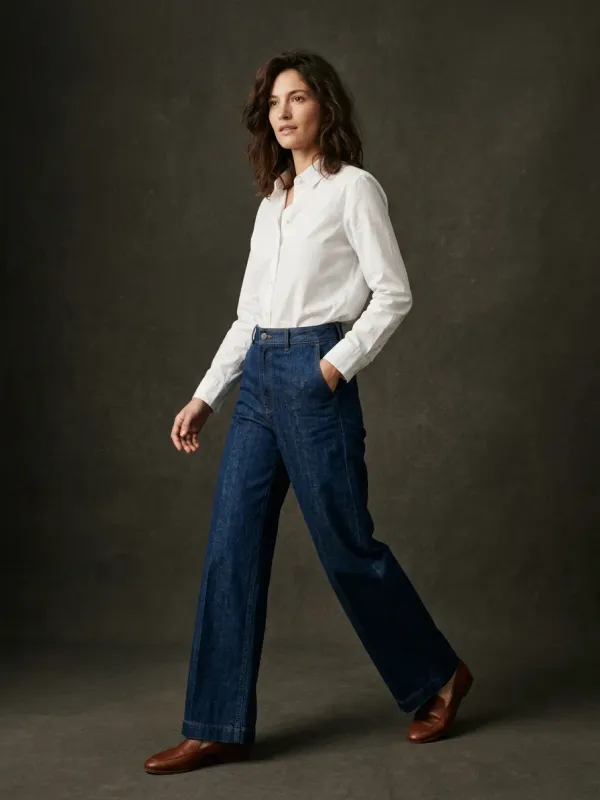
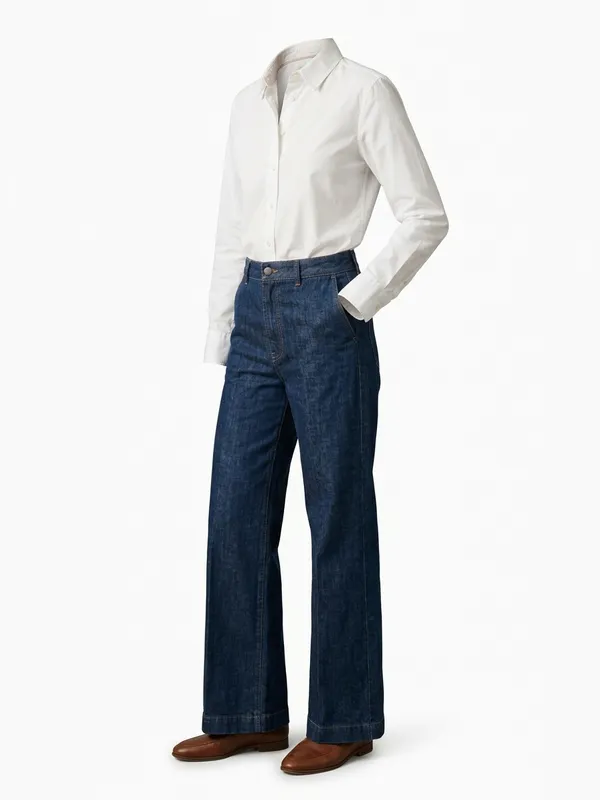
Before and after, from one real photo
The pair below is a real input and what the tool returned from it. The person and the backdrop are gone; the shirt and the jeans keep the shape they had when worn, down to the cuff tucked at the pocket. Look at the feet: the shoes stayed. That is why you check a render before you publish it, and why every result has Redo this render.
The inside of the neck: what is real and what is rebuilt
This is the part to read before you publish. In your photo, the inside of the back neck was hidden by a body, a hanger or a mannequin. Nobody photographed it, so the tool rebuilds it: the inner collar, the back neck facing and the lining you see through the opening are drawn to match the outside of the garment, not copied from it.
Two consequences. A label sewn inside the neck is left out, because the tool adds no label, logo or text that your photo does not show. And a detail that only lives inside, a contrast neck tape, a printed lining, a hanger loop, will not appear unless your photo shows it.
- If the inside matters, shoot the garment with the neck slightly open so the inside is visible, then name the detail in the field "A detail that must stay exact" under the photo. It is found in your photo and kept, and it does not use a render.
- If the inside is still not right, choose Redo this render and say what to change. The first redo of each photo is free; after that, a redo counts as one render.
- For a listing where the inside is the selling point, keep a real close-up of it next to the packshot.
Which photo gives the cleanest packshot
- Worn or on a dress form gives the most natural shape: the tool keeps the volume it sees. From a garment flat on a table, the worn shape is generated.
- The whole garment in the frame, sleeves and hem included. A cut-off cuff is guessed.
- Daylight, no flash, so the color in the packshot is the color of the cloth.
- Buttoned, zipped or open exactly as you want it shown: it comes back the way it was photographed.
- If your photo is already a clean packshot on white, the page tells you and offers the next step instead: a new render would come back close to what you have.
What it costs
Your first 2 renders are free, with no account and no card, shared across all our tools. After that a render is 5 credits ($0.50), and the front and back of one garment is 10 credits. A free account opens with a one-time welcome of 50 credits, then gets 15 credits a month, enough for 3 packshots. Under every result, Next garment takes the next photo on the same page.
Questions
Is the ghost mannequin generator really free?
Yes, for your first 2 renders, shared across all our tools, with no account and no card. Then 5 credits ($0.50) a render; a free account opens with a one-time welcome of 50 credits, then gets 15 credits a month.
Do I need a mannequin to take the photo?
No. A garment worn by someone, on a hanger or laid flat all work. Worn or on a dress form gives the most natural shape, because the tool keeps the volume your photo shows.
Is the inside of the neck real?
No, it is rebuilt. The inside of the back neck was hidden in your photo, so it is drawn to match the garment. Labels inside the neck are left out. If an inside detail matters, show it in the photo and name it in the exact-detail field.
Can I get the back of the garment as a ghost mannequin too?
Yes, with the Back view button under the result, for one more render. Made from a front photo, the back is generated; for a back you can rely on, photograph the back and render that photo too.
Do I still need Photoshop?
Not for the ghost effect: the body, the background and the hanger are removed and the neck is joined for you. Look at the result as you would at any retouch before you publish it: small details such as the number of buttons can differ from the garment.
What image do I get?
A portrait image of the garment on a white background, to download from the page or carry into the studio for an on-model shot, colorways or the back view.
Can I use it in my shop?
Yes: every render, free or paid, can be used to sell, in your own shop and on marketplaces, as long as it shows your item faithfully and follows that marketplace's rules.
What happens to my photo?
Your photo is stored for 30 days, then deleted. It is used to make your image, and by the studio if you continue there. If you order a pattern from it, a copy is kept with your order.