Can AI put my clothes on a model from a flat lay, free?
Yes. Lay the garment flat, photograph it from above and drop the photo below: it comes back worn by an AI model in a clean studio shot in about twenty seconds. Your first 2 renders are free, with no account. Fabric, color, print and cut come from your photo; the drape on the body is generated.
Two free renders, shared across all our tools. No account.
Drop a garment photo here
or choose one from your phone or computer
JPEG, PNG or WebP. Any phone photo works.
Your photo is stored for 30 days, then deleted. It is used to make your image, and by the studio if you continue there. If you order a pattern from it, a copy is kept with your order.
Flat lay to model
A flat lay is the most honest photo of a garment: the true color, the print at its real scale, every seam where it is. What it cannot show is a body. A buyer looking at a shirt on a bedsheet has to imagine where the shoulders sit and where the hem stops.
The tool keeps what the flat lay knows and adds what it cannot. It reads the garment from your photo, dresses a generated model in it, and lights the shot like a studio: a light seamless background, a relaxed pose facing the camera, the whole garment in frame. A hanger shot or a dress form works the same way.
The pair below shows the tool on a real photo. That one started from an outfit worn on location rather than a flat lay; a flat lay goes through the same tool and comes back the same way.
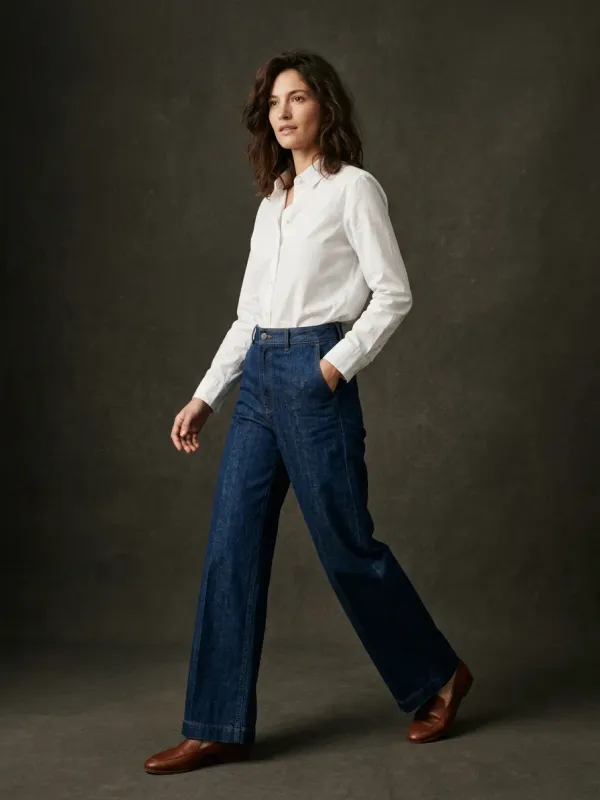
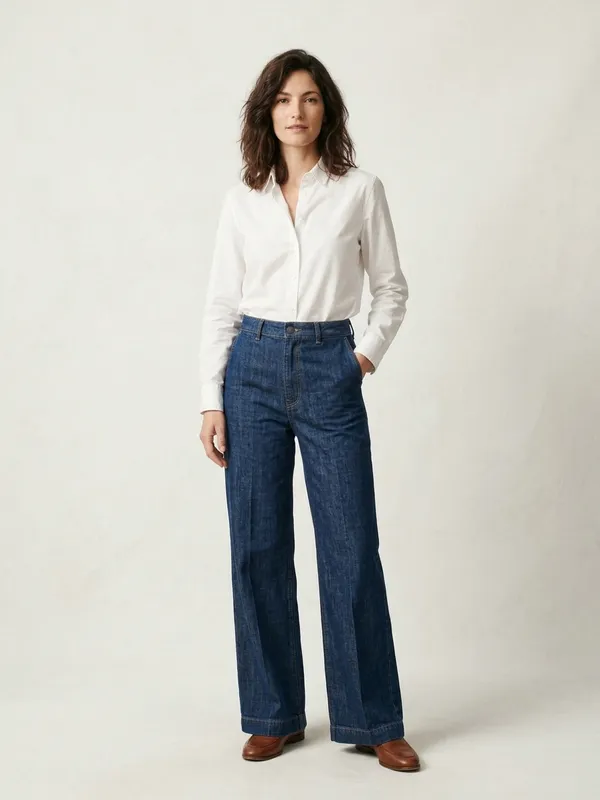
How to shoot the flat lay
The model can only wear what the photo shows. Five habits decide whether the first render is the one you keep:
- Shoot from straight above, the phone parallel to the floor. A tilted shot makes the bottom of the garment look wider than the top, and the render believes it.
- Get the whole garment in the frame, both sleeves and the hem included. Whatever the photo cuts off is guessed.
- Use daylight near a window, no flash. Flash flattens the color and adds shine the fabric does not have.
- Lay it on a plain surface that contrasts with it: a white sheet under a navy coat, a wooden floor under a white tee.
- Smooth it, and button or zip it the way you want it worn. It comes back open or closed exactly as it was photographed.
A detail that has to survive, an embroidered crest, a printed label, a horn button? Name it in the field "A detail that must stay exact" under the photo. It is found in your photo and kept as it is, and it does not use a render.
What comes from your photo, and what is generated
An on-model image made from a flat lay is part record, part estimate. Know which part is which before you publish it.
| Part of the image | Where it comes from |
|---|---|
| Color and print | Your photo. Shoot in daylight for the color to hold. |
| Fabric look and texture | Your photo, as far as the camera saw it. |
| Cut, seams, closures, trims | Your photo. Small details, like the number of buttons, can differ: check them. |
| Length on the body | Generated, from the proportions of the garment in your photo. |
| Drape and fit on the body | Generated, from the look of the fabric. A flat photo carries no weight or stretch. |
| The back | Generated, unless you photograph the back and render it too. |
| The model, the pose, the light | Generated. Nobody is photographed. |
On a model, or on a ghost mannequin?
The two shots do different jobs. On a model, the buyer reads the silhouette: how long the dress is on a body, how wide the trousers fall. On a ghost mannequin, the body disappears and the garment keeps its worn shape on white, with the inside of the collar showing: the shot product grids and marketplaces lead with.
Many listings carry both, the packshot first and the worn shot second, and both start from the same flat lay. The ghost mannequin tool is in the links at the foot of this page, with the tool that shows the same garment in another color.
What it costs
Your first 2 renders are free, with no account and no card. They are shared across all our tools, so a ghost mannequin render on another page counts as one of them.
After that, a render is 5 credits ($0.50); the front and the back of one garment is 10 credits. A free account opens with a one-time welcome of 50 credits, then gets 15 credits a month, which is 3 renders. Credit packs and plans are on the pricing page.
Questions
Can AI put clothes on a model from a flat lay for free?
Yes, for your first 2 renders, shared across all our tools, with no account and no card. Then 5 credits ($0.50) a render; a free account opens with a one-time welcome of 50 credits, then gets 15 credits a month.
Can I get the back view from one flat lay?
Only a guessed one. The Back view button renders the back from your front photo, so whatever the front cannot show, a back yoke, a zip, a vent, a print, is invented. For a back you can rely on, turn the garment over, photograph the back flat and render that photo too.
Will the length and the drape on the model be exact?
No. A flat lay carries no body, so where the hem falls and how the fabric hangs are generated from the proportions of the garment and the look of the fabric. Treat them as a close estimate, and give your own measurements next to the image.
Does it work from a hanger or a dress form instead of a flat lay?
Yes. A garment on a hanger, on a dress form or on a person goes through the same tool. If your photo is already a worn shot you are happy with, the page offers the next step instead of a second model.
Is the model a real person?
No. The model is generated; nobody is photographed and the image borrows no real person. It is a product image made from your garment photo.
Can I put the clothes on a photo of myself?
Not with this tool. It takes one photo, the garment, and renders it on a studio model. It is a product photo tool, not a virtual fitting.
Can the model's face be left out?
Yes. Under the render, choose Redo this render and write "crop at the chin" or "face out of frame". The first redo of each photo is free; after that, a redo counts as one render.
Can I use it in my shop?
Yes: every render, free or paid, can be used to sell, in your own shop and on marketplaces, as long as it shows your item faithfully and follows that marketplace's rules.
What happens to my photo?
Your photo is stored for 30 days, then deleted. It is used to make your image, and by the studio if you continue there. If you order a pattern from it, a copy is kept with your order.