How do you do ghost mannequin photography?
The garment is photographed on a mannequin whose chest and neck pieces come off, then the inside of the back neck is photographed separately, and an editor masks out the mannequin and joins the two pictures so the garment looks worn by no one. At home you can do the same with a dress form and an image editor, or skip both and make the effect from one photo of the garment.
How a studio does it
The effect, also called invisible mannequin or hollow man, is two photographs and a careful edit. The garment holds the shape of a body, and through the neck opening you see the inside of the back collar instead of a mannequin.
- Dress the form. The garment goes on a ghost mannequin, a form whose neck, chest plate and sometimes arms come off. It is pinned and clipped at the back so it sits the way it would on a person, and steamed in place.
- Light it evenly. Two soft lights at about 45 degrees on each side, a white backdrop lit on its own so it falls to pure white, and the camera on a tripod, square to the garment.
- Take the main shot. The front of the garment on the form. The removable pieces stay in for this frame, or come out if the opening shows them.
- Take the inside shot. The garment is turned, or the neck piece removed, and the inside of the back neck is photographed: collar, facing, label. Same light, same camera height.
- Composite. In the editor, the mannequin is masked out, the inside-neck picture is placed into the opening and warped to fit, and the edges are cleaned.
- Finish. A soft shadow is added or kept under the garment, the color is matched to the real piece, and the file is exported at the size the shop asks for.
Doing it at home
Without a studio, the method is the same with lighter means: a dress form in your size range, a window for light, a white wall or a white sheet behind, and an image editor with masks. Budget a dress form, and an evening to learn the mask and warp tools; the composite is the slow part, garment after garment.
If you do not have a form, photograph the garment worn by someone, or on a sturdy hanger against a plain wall. The shape is less precise than on a form, and the person or the hanger has to be removed in editing, but the volume of a worn garment is the closest you will get to a form.
The one-photo shortcut
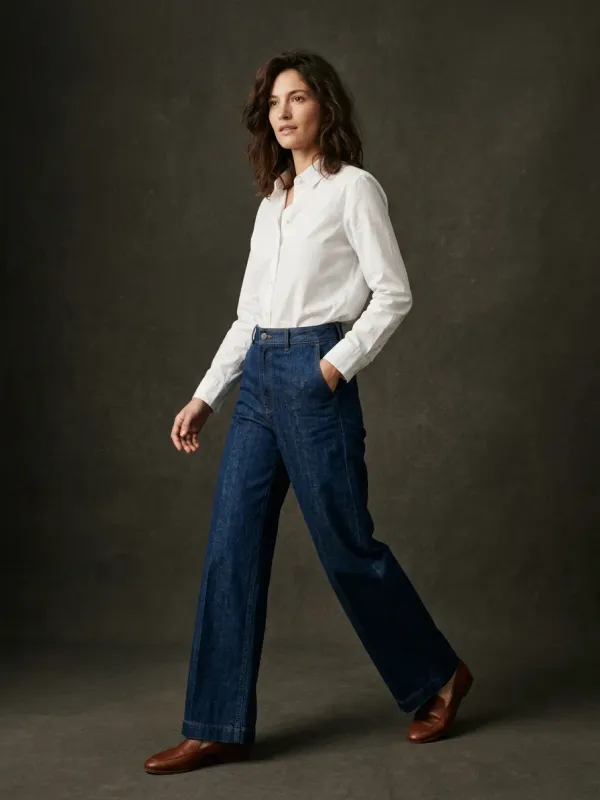
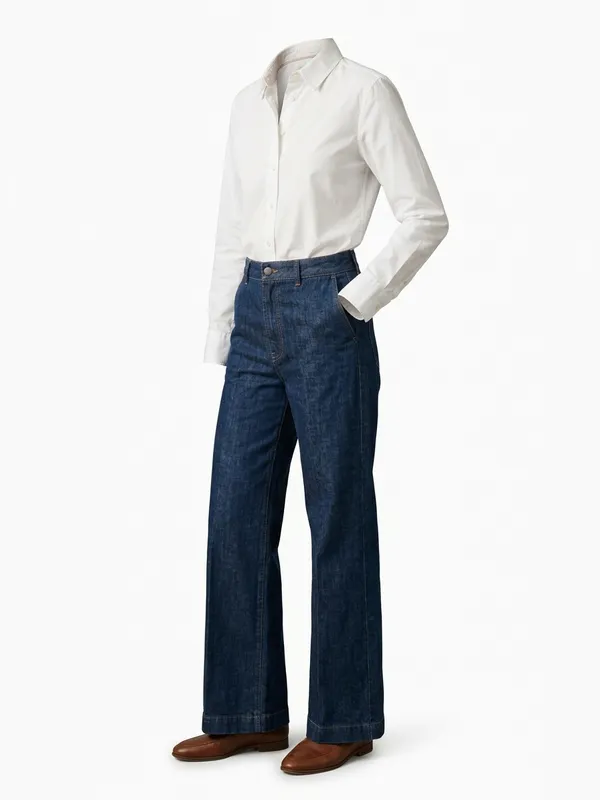
The steps above exist to fill two gaps: the body that has to disappear and the inside of the neck that nobody sees. An image model can fill both from one photo of the garment, worn, on a hanger or on a form. The pair below is our own demo: the photo in, and the packshot that came back.
Read the result the way an editor would. The outside of the garment, its color, print and cut, comes from your photo. The inside of the back neck is rebuilt to match, not photographed: a label sewn inside is left out. In this example the shoes stayed in the frame, which is why every result has a redo.
Which way suits you
| Way | What you need | What is real in the image |
|---|---|---|
| Studio | A booking and a budget per image | Everything, the inside of the neck included |
| At home, form and editor | A dress form, a window, an editor and time per garment | Everything, if you shoot the inside of the neck |
| From one photo | One photo of the garment | The outside of the garment; the inside of the neck and the worn shape on a flat photo are generated |
Where the inside is the selling point, a printed lining, a woven neck label, a contrast facing, photograph it for real and show the close-up beside the packshot, whichever way you made it.
What the shortcut costs
Your first 2 renders are free, shared across all our tools, with no account and no card. After that a packshot is 5 credits ($0.50), and the front and the back of one garment 10 credits. A free account opens with a one-time welcome of 50 credits, then gets 15 credits a month.
Try the effect on your own photo
Drop one photo of the garment, worn, on a hanger or on a form. It comes back as a ghost mannequin packshot on white in about twenty seconds.
Questions
What is a ghost mannequin?
A dress form whose neck, chest plate and sometimes arms come off, so the opening of a garment can be photographed without the form showing. The name also covers the finished effect: a garment shaped like a body with no body in it.
Can I do ghost mannequin photography without a mannequin?
Yes. Photograph the garment worn or on a sturdy hanger and remove the person or the hanger in editing, or make the packshot from that one photo with an image model. A form gives the most precise shape.
How is the inside of the neck shown?
In a studio, by a second photograph of the inside of the back neck, placed into the opening. From one photo, it is rebuilt to match the garment, so a label inside the neck does not appear.
Why do shops use ghost mannequin photos?
The cut reads at a glance, every garment in a grid sits the same way, and nothing distracts from the product. Many marketplaces lead with a packshot on white for the same reasons.
Which editor do I need for the composite?
Any editor with layers, masks and a warp tool. The work is in the masking around the neck and the sleeves, not in the software.