How do I get a white background on clothing photos?
Either light a white backdrop until it reads pure white in the camera, or cut the garment out of an ordinary photo and place it on white. A background remover keeps whatever holds the garment, a hanger, a mannequin or a person, so for a clean packshot use a ghost mannequin edit, which removes them too.
Three ways to a white background
They differ in what you need on the day and in what is left in the frame.
| Way | What it takes | What is left in the frame |
|---|---|---|
| A lit white sweep | A white paper or vinyl backdrop, light on the backdrop and separate light on the garment | The garment and its support, on a true white, with a natural shadow |
| Background removal | Any clean photo and a cut-out tool | The garment and whatever held it: the hanger, the mannequin, the model |
| A ghost mannequin packshot | One photo of the garment, worn, on a hanger or on a form | The garment alone, holding its worn shape, on white |
Shooting on white at home
If you want the white in camera rather than in editing, these steps get close with a phone:
- Hang a roll of white paper or a white sheet so it curves from the wall onto the floor or the table: no corner line behind the garment.
- Put the garment a little in front of the backdrop, so its shadow falls behind it and not on it.
- Light the backdrop brighter than the garment: a window behind or beside it, or a lamp aimed at the backdrop only.
- Tap the garment to focus and lower the exposure until the garment keeps its detail; the backdrop can go slightly grey.
- In the editor, raise the whites until the backdrop reads pure white, and stop before the garment loses its texture.
What marketplaces ask for
Each marketplace sets its own rules, and they change, so read yours before you shoot a range. Two examples, read on their own pages on 19 October 2026:
- Amazon’s seller blog says product shots should be taken against a white background, RGB 255, 255, 255, and that the product should fill 85% or more of the frame.
- Zalando’s apparel guide for its partners asks that invisible mannequin and flat-lay packshots always include the inner back view.
- Etsy asks for original photos of the actual item, not renderings: an edited photo of your real garment on white is a different thing from a generated one. Our page on Etsy quotes its rules.
From a photo on location to a packshot on white
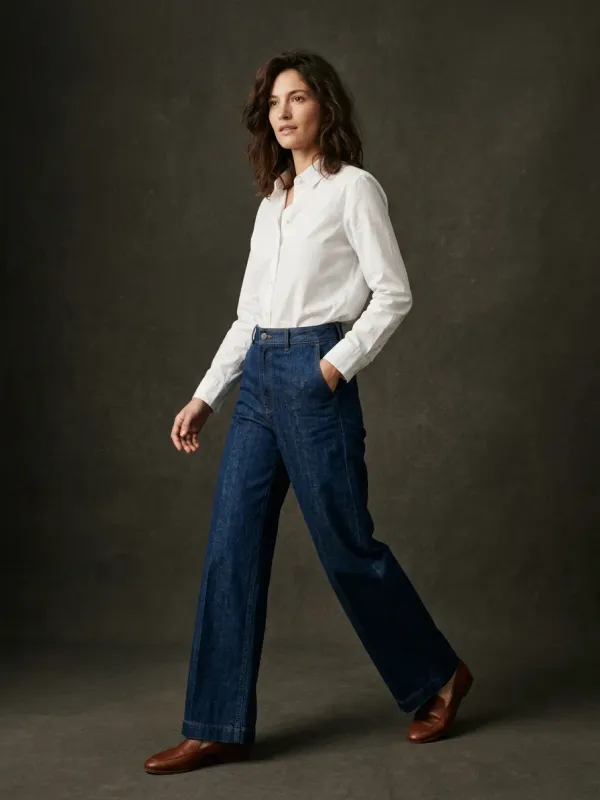
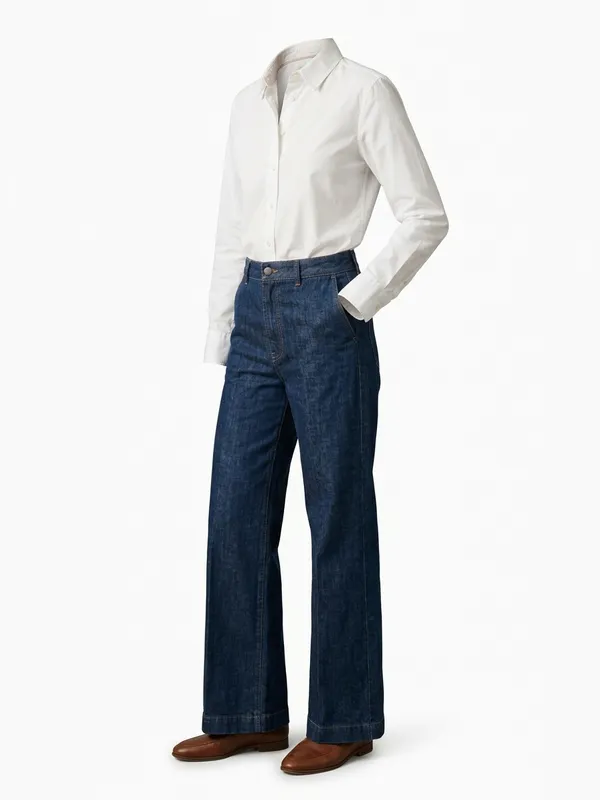
The pair below is our own demo. The photo in was taken on location against a dark wall; the ghost mannequin edit removed the person and the backdrop, kept the worn shape of the shirt and the jeans, and rebuilt the inside of the neck. The shoes stayed in the frame: read every result before you publish it, and redo it if something remains that should not.
Where a white background goes wrong
- White garments on white. Light the garment from the side so its edges keep a shadow, or the shirt dissolves into the page.
- Sheer fabric, lace and fringes. A cut-out tool either keeps the old background inside the holes or eats the fabric; check at full size.
- Pushed whites. Raising the exposure to whiten the backdrop also bleaches pale garments: correct the backdrop, not the whole picture.
- A shadow that floats. A garment cut out and pasted on white with no shadow looks pasted; keep a soft shadow under it.
What the packshot costs here
Your first 2 renders are free, shared across all our tools, with no account and no card. After that a packshot on white is 5 credits ($0.50), and the front and the back of one garment 10 credits. A free account opens with a one-time welcome of 50 credits, then gets 15 credits a month.
Make the packshot on white from your photo
Drop one photo of the garment. The hanger, the form or the person goes, the garment keeps its worn shape, and it comes back on white in about twenty seconds.
Questions
Why does my white background look grey?
The camera exposed for the garment and the backdrop got less light. Light the backdrop on its own, brighter than the garment, or raise the whites of the backdrop in editing without touching the garment.
Does a background remover take the hanger out?
No. It separates the subject from the background, and the hanger, the mannequin or the person counts as part of the subject. Removing them, and rebuilding the inside of the neck they hid, is a ghost mannequin edit.
How do I photograph a white garment on a white background?
Light it from one side so its edges cast a soft shadow, keep the backdrop a touch brighter than the garment, and never push the exposure until the fabric loses its texture.
Should I keep a shadow under the garment?
A soft one, yes, unless your marketplace forbids it. It anchors the garment; a cut-out with no shadow looks pasted onto the page.
Is the packshot on white free?
Your first 2 renders are free, shared across all our tools, with no account and no card. Then 5 credits ($0.50) a render; a free account opens with a one-time welcome of 50 credits, then gets 15 credits a month.