How do I test colorways before sampling every color?
Sample the garment once, in one color, and preview the other colors on a photo of that sample to narrow the range before anything is dyed. Then ask the mill for lab dips, small swatches of your real fabric dyed to each color you kept, and approve the production color on the swatch in daylight, never on a screen.
From a long list to approved colors, in order
The expensive mistakes in color happen in two places: sampling colors that will never sell, and approving a color on a screen. This order avoids both.
- Name each color with a physical reference. A code from a textile color system or a swatch you can post to the mill, never only a hex code: a screen color has no single meaning on fabric.
- Sample the garment in one color. The fit, the construction and the fabric are decided on that sample; color is a separate question.
- Preview the range on the sample. Photograph it in daylight and see the same garment in each candidate color, side by side, in the same light and the same pose.
- Narrow the range. Cut to the colors that work together as a story and that your buyers respond to. Showing previews to your audience is fair, as long as they are presented as previews.
- Order lab dips for the survivors. The mill dyes small swatches of your actual fabric to match each reference. You approve, or comment and ask for another round.
- For prints, ask for a strike-off. A printed test on the real fabric shows how the colors of the print sit on that cloth.
- Approve under one light and keep the standard. Judge every swatch under the same daylight, and keep the approved swatch as the reference production is checked against.
What a color preview is good for
A preview answers the questions a buyer, a co-founder or an audience can answer from a picture: which colors belong together, which one leads, which one nobody picks. It is quick and it keeps everything else equal: the same cut, the same seams, the same fabric texture, so you compare color alone.
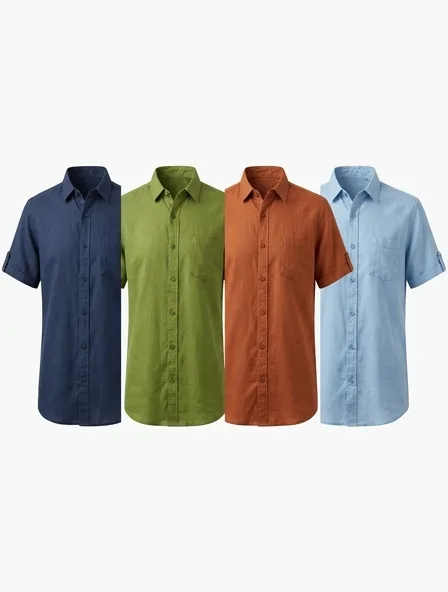
The picture below is our own render of one shirt in four colors, generated from a description, not from a sample. From a photo of your own sample, the colorway tool keeps your garment, your fabric and your light, and changes the color only.
Where a screen stops
A preview narrows the list. It does not approve a color, for reasons no software removes:
- Screens differ. The same file looks warmer on one phone and cooler on another, and none of them is calibrated to your mill.
- Fibers take dye differently. The same dye recipe reads one way on cotton and another on polyester or wool, and a blend shows both.
- Fabric changes color. A brushed, napped or shiny surface reads lighter or darker than a flat one in the same dye.
- A recolor is an approximation. It is close enough to choose between colors, not close enough to sell a variant you have not seen in fabric.
So the order matters: preview to decide which colors to dye, lab dip to decide the color itself.
What the previews cost here
Your first 2 renders are free, shared across all our tools, with no account and no card, one color each. After that a colorway is 4 credits; a free account opens with a one-time welcome of 50 credits, then gets 15 credits a month. Lab dips are quoted by your mill.
See your sample in the colors on your list
Drop a photo of the sample and pick a color by swatch, name or hex code. The same garment comes back in that color, cut and fabric kept.
Questions
What is a lab dip?
A small swatch of your actual fabric dyed by the mill to match a color reference you gave. You approve it, or comment and ask for another round, before the fabric for production is dyed.
Can I approve a production color from a screen?
No. Screens differ and fibers take dye differently. Use the screen to choose which colors to dye, and approve each one on a lab dip in daylight.
How many colorways should a first collection have?
Fewer than you think, because each color multiplies the fabric to buy, the minimums to meet and the stock to hold. Start with the fewest colors that tell the story: adding one later costs less than holding one that does not sell.
Can I sell a color I have only seen as a preview?
Not safely. A buyer who receives a different shade sends it back. Photograph the real variant, or at least check the preview against it, before you list it.
Does the colorway tool keep my fabric and cut?
Yes. It changes the color of the garment only; the cut, the seams, the trims, the texture of the fabric, the pose and the background stay as they are in your photo.