Can AI put my loafers on a model for free?
Yes. Photograph one pair from the side and the tool below dresses a model in them, from the trouser hem down or head to toe, with your leather, sole and stitching kept from the photo. The loafer stays yours; only the wearer is generated.
Two free renders, shared across all our tools. No account.
Drop your loafer photo here
or choose one from your phone or computer
JPEG, PNG or WebP. Any phone photo works.
Your photo is stored for 30 days, then deleted. It is used to make your image, and by the studio if you continue there. If you order a pattern from it, a copy is kept with your order.
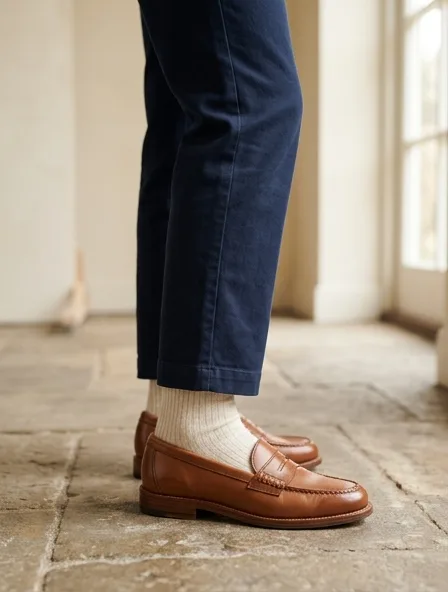
Two framings sell a loafer
A loafer is read at the ankle. Where the trouser ends, what shows between hem and vamp, and how the shoe sits on the floor decide whether the picture says office, weekend or evening. Pick the framing before you render, because it changes what the model wears with your pair.
- Cropped at the calf. The trouser hem, the sock or bare ankle and the loafer fill the frame. It is the shot a product page and a wholesale sheet need, because the vamp, the saddle and the sole edge stay large enough to inspect.
- Full length. The whole outfit, the loafer small at the bottom. It is the lookbook page and the social post: it sells the way of dressing, not the welt.
- A seated shot, legs crossed. The sole and the heel block face the camera, which suits a lug or platform sole you want people to notice.
Render the full-length look first, then tap Redo this render and write "crop at mid-calf, camera at ankle height" to get the close framing from the same result.
What the render must keep, loafer by loafer
Every loafer family has one detail that buyers check first. Shoot your sample so that detail is sharp, because the render keeps what it can see and guesses what it cannot.
| Loafer | The detail buyers check | Pairs well in the render with |
|---|---|---|
| Penny | The saddle strap and its cut-out slot, and the raised apron seam around the toe | Straight chinos with a short break, white or navy socks |
| Horsebit | The metal bit across the vamp: its shape, finish and how far it sits from the toe | Cropped tailored trousers, bare ankle |
| Tassel | The tassels and the lacing that runs around the collar | Flannel trousers, fine ribbed socks |
| Chunky lug sole | The sole height and the tread pattern seen from the side | Wide-leg trousers or a midi skirt with white socks |
The photo to give it
One pair, side profile, toe pointing left, on a plain floor or a sheet of paper, in daylight from a window. Put the second shoe slightly behind the first so the heel counter of one and the vamp of the other are both visible. A phone at ankle height is enough; a photo shot from above shortens the shoe and the render will copy that.
Clean the welt and the sole edge before you shoot. Scuffs and dust come back on the model, and on a pale sole they read as stains.
Where loafer renders go wrong
Three things fail more than the rest, and each has a fix you can write in Redo this render.
- Suede nap. Brushed suede can come back smooth, like calf leather. Write "keep the brushed suede texture, matte" and keep the light soft in your photo.
- Metal bits and buckles. A polished bit reflects the room and the render may bend or duplicate it. Write "one gold horsebit, same shape as the photo" and check it on the result before you publish.
- Patent leather. The glare is part of the look, but it hides the apron seam. Shoot patent in shade, never in a sunbeam.
Before any image goes on a product page, compare it with the pair in your hand: the bit, the stitch count around the apron and the sole color are where a customer notices the difference.
Questions
Will the render show my exact loafers or a similar pair?
Your pair: the tool is told to keep the leather, color, sole, stitching and hardware from your photo and to add nothing. It reproduces what the photo shows, so a hidden side or a blurred bit may be guessed. Check every result against the sample before you publish it.
Can I choose socks or a bare ankle?
Yes. After the first render, tap Redo this render and write the change, for example "white ribbed socks" or "bare ankle, cropped trousers". The redo edits the image instead of starting over. The first redo of each photo is free; after that, it is priced as one render.
How much does it cost after the free renders?
Then 5 credits ($0.50) a render; a free account opens with a one-time welcome of 50 credits, then gets 15 credits a month, and the smallest top-up is $5 for 50 credits.
Can I get a pattern for my loafers here?
No. Shoes are made on a last by a footwear factory, and the pattern service on this site drafts garments only. Use the renders to brief your factory and to sell the pair before the production run.