Can AI make a video of my dresses from a photo?
Yes. Upload one full-length photo of the dress and pick a runway walk or a slow turn on an invisible mannequin. The clip is 5 seconds, vertical, and keeps the color, print and neckline from your photo; the hem moves the way a dress in that fabric would.
Your first video is free. Then 40 credits a 5-second clip.
 Photo
PhotoAn example clipMade in the studio: one generated still (5 credits), then a 10-second clip from it (80 credits), 85 credits in all. This page makes 5-second clips at 40 credits, and every clip depends on its photo.
Drop your dress photo here
or choose one from your phone or computer
JPEG, PNG or WebP. Any phone photo works.
40 credits a clip: 5 seconds, 1080p, no sound.
Your first video is free: one on a free account, the same one as in the studio, or without an account one per connection every 30 days.
Your photo is stored for 30 days, then deleted. It is used to make your image, and by the studio if you continue there. If you order a pattern from it, a copy is kept with your order.
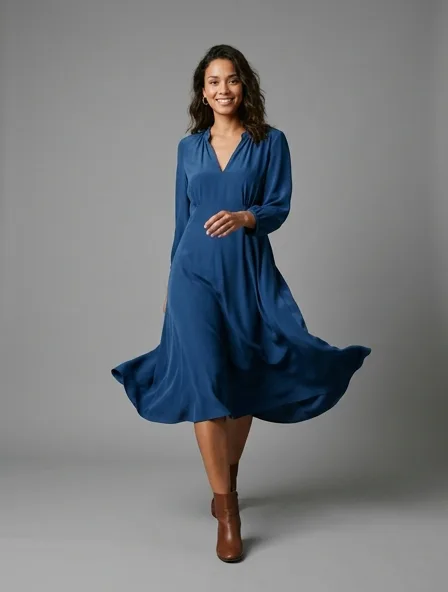
Why a dress, more than any other piece, needs to move
A still photo of a dress shows its shape. A walk shows its weight: whether the skirt swings or clings, whether the slit opens, whether a bias-cut satin pours or a cotton poplin holds its flare. Customers who cannot touch the fabric read it from the movement, and that is the question a short clip answers better than ten photos.
- The runway walk sells the dress worn: the hem, the slit, the sway at the hip. Best for fluid fabrics and anything long.
- The turn on an invisible mannequin shows the back: the zip, the open back, the bow. Best for structured dresses and for product pages.
What the clip does with each kind of dress fabric
The video is generated from one still, so the motion is inferred from what the fabric looks like. Some cloths make that easy.
| Fabric | In motion | Shoot it |
|---|---|---|
| Satin, silk | Pours and catches the light; the strongest clips | Soft side light so the sheen reads, never flash |
| Chiffon, organza | Floats, but layers can merge when they cross | Against a dark ground so the layers separate |
| Cotton, linen | Holds its flare, swings at the hem | Pressed, because creases are animated too |
| Jersey | Clings and follows the body | On a mannequin, so the shape is not lost on a hanger |
| Velvet, sequins | Rich, though sequins can sparkle in a pattern that shifts | Diffuse light, slightly darker exposure |
Length and drape: what to check before you post
Look at the hem first. A midi can come out a few centimeters longer or shorter than yours, and a maxi worn by a walking model may brush the floor when yours does not. If the length matters to the sale, use the turn on the mannequin, where nothing pulls the dress down.
Then look at the print. Large florals and stripes stay stable; very small repeats can swim slightly as the skirt moves. A clip is for showing how the dress moves, and the product photos remain the record of the exact print.
Dress films from the studio
The video library holds four dresses made in the studio, from a satin slip dress on a catwalk to a gown on a staircase. Watch them to judge the motion before you spend credits on yours.
Questions
What does a dress video cost?
40 credits for a 5-second clip, with an account. One $5 top-up (50 credits) pays for it. A guest or a new account gets a first video free in the studio.
Can the model in the video wear my dress, not a similar one?
The clip starts from your photo and is told to keep the fabric, color, print and construction. Check the neckline and the back against your sample: those are the details a generated walk most often simplifies.
Which photo of my dress works best?
Full length, front on, on a mannequin or a person, in even light, with the whole hem visible. A dress on a hanger works, but the model then has to invent the shoulders.
Is the video vertical?
Yes, 9:16, ready for stories, reels and a product page on a phone.