Can AI make a product photo of my bags?
Yes. Photograph the bag anywhere, on a table or in your hand, and the tool returns it alone on white, as a studio packshot, with the leather grain, stitching and hardware kept from your photo. Start with the front view, then repeat for the angles your shop page needs.
Two free renders, shared across all our tools. No account.
Drop your bag photo here
or choose one from your phone or computer
JPEG, PNG or WebP. Any phone photo works.
Your photo is stored for 30 days, then deleted. It is used to make your image, and by the studio if you continue there. If you order a pattern from it, a copy is kept with your order.
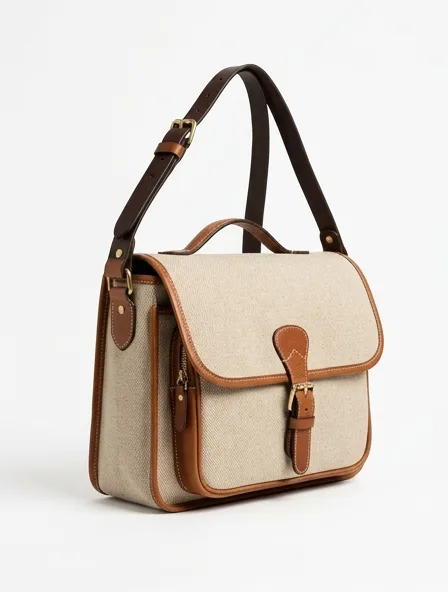
The five pictures a bag page needs
A dress sells on one good image. A bag is bought on proportions, so a buyer looks for the same set on every shop: one photo per angle below, each starting from your own photo of that angle.
- Front, straight on, handles up. The hero image and the one marketplaces want on white.
- Three-quarter, turned about 45 degrees. It shows the gusset, so the depth of the bag becomes readable.
- Strap drop: the bag hanging from its handle or strap, with the drop visible. Write the drop in centimeters in the listing too, because a picture alone cannot give a measure.
- Interior: the bag open, pockets and lining visible. Shoot it open; the tool can clean the background but it cannot invent an inside it has not seen.
- Scale on the body: the bag worn on the shoulder or in the hand, so the size reads. Use the clothes on a model tool for this one.
Shooting the bag for the tool
Stuff the bag with paper so it stands at its real shape; an empty bag sags and the packshot will keep the sag. Stand the handles up, close every zip and turn the shoulder strap behind the bag unless the strap is the point.
Use daylight from one side. Leather grain shows in side light and disappears in flat light, and the grain is what tells a buyer whether the leather is pebbled, smooth or saffiano-embossed.
Hardware: the part buyers zoom in on
Buckles, clasps, feet and zip pulls carry the price of a bag, and polished metal is the hardest thing to photograph: it mirrors whatever is in front of it, including you and your phone. Shoot the bag with a white sheet of paper held opposite the hardware so it reflects white, and keep the clasp in focus.
Check the result closely. The tool keeps the hardware from your photo and adds none, but a tiny engraved mark can soften. If an engraved logo matters, keep a close-up taken with your own camera next to the packshot.
Questions
Can I photograph a bag on a white background with AI for free?
Yes, 2 renders without an account, counted across all our tools. After that a packshot costs 5 credits ($0.50), and a free account receives a one-time welcome of 50 credits, then 15 credits a month.
Can it keep my logo and hardware exactly?
It is told to keep every visible detail and to add nothing, no labels or logos that are not in your photo. Fine engravings can soften, so check them before you publish; a render is not a guarantee of an exact logo.
Can I get the bag shown on a model?
Yes. Use the clothes on a model tool with the same photo; ask in a redo for "bag on the shoulder" or "held in the hand".
Do you draft patterns for bags?
Not at the moment. Our pattern service drafts clothing; bags are built from body, gusset, handles and hardware by a leather-goods maker.